Business system
Plugyo
Client · Plugyo · 11 min read
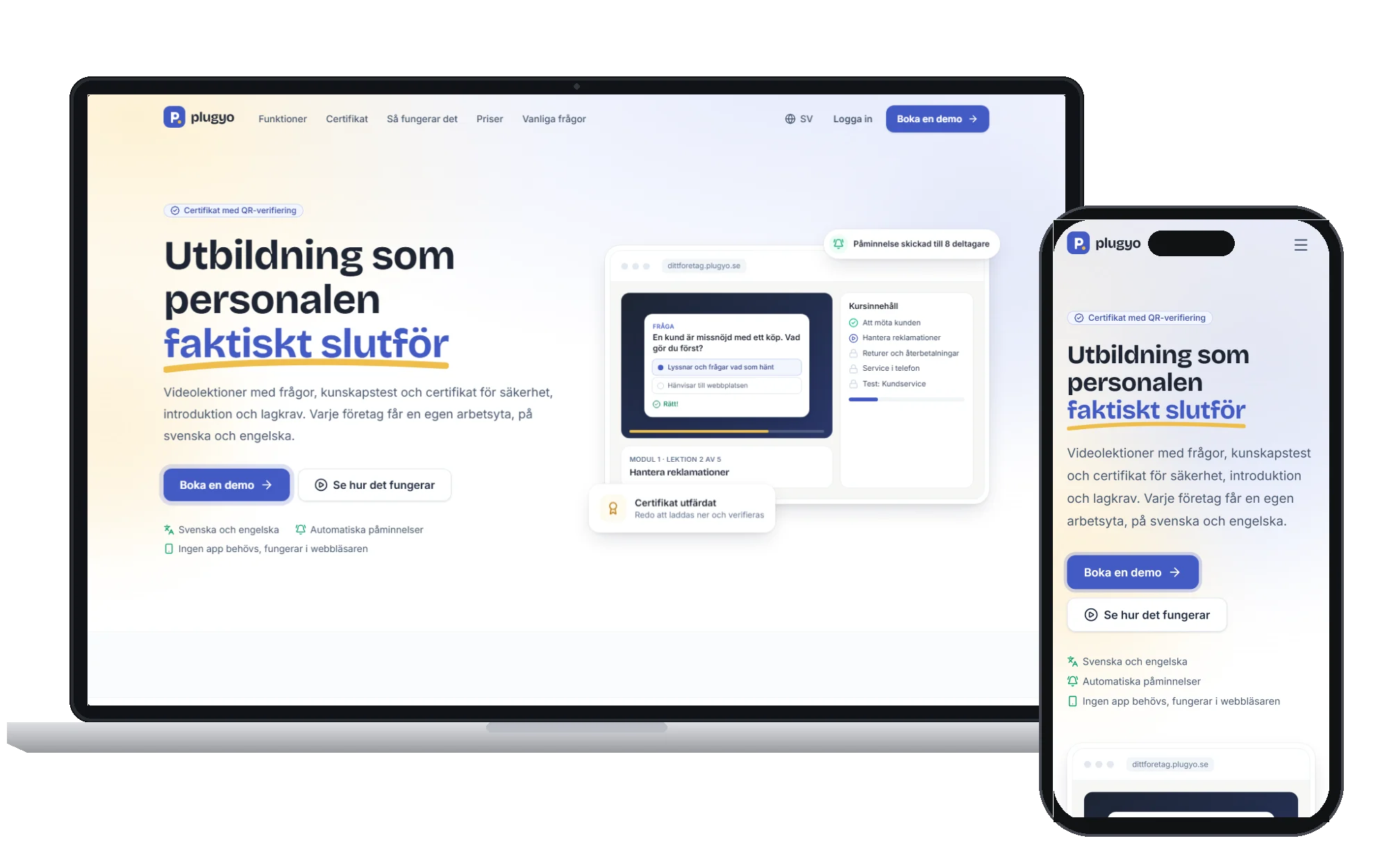
A training platform for Swedish companies: every company gets its own workspace for video courses, knowledge tests, QR-verified certificates, access rules, reminders and reporting.
Problem
Companies that train staff for safety, onboarding and compliance were juggling slide decks, PDFs, spreadsheets and email reminders. Nobody could say with confidence who had finished which course, certificates were hard to verify, and every new employee meant someone working out by hand which training they needed.
What we built
We built Plugyo as a multi-tenant SaaS where every company gets its own address and its own database. Admins build courses from modules, video lessons with in-video questions, knowledge tests and slides, group them into programs, and let tags and rules hand out the right training automatically. Team leaders follow their teams, partners manage their own customers and are invoiced separately, and certificates with QR codes are issued as soon as a learner passes. Billing runs through Stripe and Qliro, and a separate super-admin panel with two-factor sign-in runs the platform.
Outcome
Training runs itself: new hires get the right courses on day one, reminders go out without anyone chasing, certificates can be verified by anyone, and admins see who has finished, who is late and who failed a test in one place.
The full story
Background
Most companies do not think of themselves as training organisations, yet almost all of them train people every week. A new employee in a store needs to learn how to handle complaints and returns. A warehouse needs every new starter to understand fire safety and lifting before they touch a pallet. A care provider has to show that its staff have completed hygiene and GDPR training. A construction company needs its people registered for the right safety courses before they set foot on site.
In most of these companies the training itself exists. It lives in slide decks, PDF handbooks, a few recorded videos and the head of whoever has been there the longest. What is missing is the system around it: a reliable way to hand the right course to the right person, to know who has actually finished it, to remind the ones who have not, and to prove it afterwards with a certificate that someone outside the company can trust.
Plugyo is the platform we designed and built to be that system. It is a training platform for Swedish companies where every company gets its own workspace, its own address and its own logo, and where courses, tests, certificates, reminders and reports run on their own once they are set up. It grew out of our earlier work on Studyo and was rebuilt over a long series of iterations into a product that companies can sign up for, pay for and run without us in the loop.
The problem in detail
When we sat down with companies that train staff, the same pattern came up again and again.
Training was assigned by memory. When someone started, a manager had to remember which courses that role required, send the links by email and hope nothing was forgotten. When the requirements changed, nobody went back to check who was missing the new course.
Completion was a guess. A video link in an email does not tell you whether it was watched. A PDF does not tell you whether it was read. Managers relied on people saying they had done it, or on a spreadsheet that someone updated by hand when they remembered.
Certificates were hard to trust. A certificate made in a word processor can be edited by anyone. Customers, auditors and site managers increasingly want to check a certificate themselves, and a PDF on its own cannot answer that question.
Reminders took real time. Chasing unfinished courses was somebody's job, done by hand, every month. When that person was busy, the reminders simply stopped.
Partners and team leaders had no view of their own. Companies that train staff for other businesses, or that have team leaders responsible for their own groups, had no way to give those people access to exactly their part of the data, and no way to invoice partners for the training they bought.
None of this is solved by a better video player. It is solved by a system that understands companies, roles, rules, progress and proof.
Goals
We set out a short list of goals before writing any code:
- Every company should get its own isolated workspace, with its own address, branding and administrators, so that one company's data can never appear in another's.
- Training should be handed out by rules, not by memory. When a person gets a role or a tag, the right courses should follow automatically.
- Progress should be real. A lesson should only count when the learner has actually watched it and answered its questions.
- Certificates should be verifiable by anyone, without having to call the company that issued them.
- Reminders and course renewals should run on a schedule, without anyone pressing a button.
- Companies should be able to pay for the platform themselves, by card or by invoice, and keep running without manual work from us.
What we built
A workspace for every company
Plugyo is a multi-tenant SaaS. Each company gets its own subdomain, such as yourcompany.plugyo.se, and its own database. The platform finds the company from the address in the browser, so the same application serves every customer while their data stays fully separated. Companies choose their logo, colours and browser icon, and that branding follows them onto every page and every certificate they issue. Learners sign in to their own company's address and never see anyone else.
Courses that people actually finish
Administrators build courses from modules, lessons and knowledge tests. Video lessons can contain chapters and questions placed inside the video itself. Learners cannot skip ahead past a question, and a lesson only counts as completed once its questions have been answered. The player remembers exactly where a video stopped, so learners can continue on another device without hunting for their place.
Knowledge tests support single and multiple correct answers as well as image questions, where the learner clicks the right place in a picture. Tests can draw random questions, use a pass mark and show explanations afterwards, so a failed attempt teaches something instead of just blocking the learner.
Not every course is a video. PowerPoint presentations can be uploaded and turned into slides, required reading can be attached as materials, and classroom sessions can be planned with a fixed number of seats that learners book themselves. For companies with existing material, whole course structures and quizzes can be imported from Excel, with a preview step before anything is saved.
Courses can also exist in several languages. A company adds a language version of a course, can have the copy translated automatically, and each learner takes the course in their own language. The interface itself is available in Swedish and English.
Programs, tags and access rules
The part of Plugyo that does the most work is also the least visible. Courses can be grouped into programs, which are learning paths with levels that a learner moves through in order. Learners carry tags, such as the team they belong to or the type of role they have, and rules connect tags to courses and programs.
In practice this means a company describes its training requirements once. When a new employee is tagged as a new hire in a store, the onboarding program is assigned automatically. When a course has a fixed validity period, access ends when it expires and the course can restart on its own for courses that must be repeated. Nobody has to remember who needs what.
Roles for everyone involved
Plugyo has distinct roles with their own permissions. Administrators build courses and manage the workspace. Team leaders follow the progress of their own team without seeing everyone else. Partners, which are companies that buy courses for their own people, manage their own customers and are invoiced separately for what they use. Learners get a start page that always shows the course to continue and the next lesson, together with their progress, test results and certificates in one place.
Certificates people can trust
When a learner passes a course, a certificate is issued automatically. Companies choose a design and a colour, start from ready-made texts for common topics such as onboarding, customer service and GDPR, and add a signature. Every certificate carries a QR code that leads to a public verification page, so a customer, auditor or site manager can check that a certificate is genuine in seconds. For construction companies, the platform also tracks ID06 registration agreements and confirmations per learner.
Reminders, reports and integrations
Every morning the platform reminds learners about courses they have not finished, company by company. Every night it ends expired course access and restarts repeating courses. Administrators see who has finished, who is late and who failed a test, with reports per learner, per course and per partner that can be exported to Excel.
Companies that sell courses can connect their WooCommerce shop. A purchase creates the learner and gives access through tags, without anyone copying details between systems. There is also an API for companies that want to connect their own tools.
Billing that runs without us
Companies pay for their plan on a billing page inside their workspace. Card payments, Klarna and Swish run through Stripe, including subscriptions and invoices, and companies that prefer to pay by invoice can use Qliro with 30 days to pay. Because Qliro does not renew on its own, the platform sends a new checkout a week before the plan ends. Every plan includes every feature; plans differ only in the number of users and the level of support.
A protected control room
The platform itself is run from a separate super-admin panel that only answers on its own address. Every team member signs in with a password and a code from an authenticator app, with one-time recovery codes for a lost phone. Owners invite people, give them roles such as Marketing, Finance or Support that open only the parts of the panel they need, and can turn access off at any time. Every sign-in, failed sign-in and change made in the panel is written to an activity log, and a sign-in from a new device sends an email to the person.
Technical approach
Plugyo is built on Laravel with Livewire for the interactive parts of the interface. Tenancy gives every company its own database, which keeps data separated at the storage level rather than relying on a filter in every query. Roles and permissions are handled with a dedicated permissions layer, so each route and each screen checks what the signed-in person is allowed to do.
Course media such as videos, slides, materials, images and logos are stored in a private Amazon S3 bucket in Stockholm. Nothing in the bucket is public; pages receive signed links that are valid long enough to finish a long video and then expire. Housekeeping commands copy existing files to S3, audit storage for abandoned and missing files per company, and clean up temporary uploads every night.
Sensitive personal data is treated accordingly. Personal identity numbers are encrypted at rest and searched through a keyed hash, so they can be matched without being stored in plain text. Emails and notifications are sent through a queue so that a slow mail provider never slows down the page a learner is looking at.
Quality is protected by an automated test suite that runs against its own databases and refuses to touch anything that is not a test database. The same suite, together with the front-end build, runs on every push and pull request.
How we worked
Plugyo was not built in one big release. It started as Studyo and was reshaped through hundreds of small, reviewed changes, each one moving a part of the product closer to how companies actually train people. Early versions focused on courses and progress. Later work added programs and rules, partners and invoicing, certificate design, multi-language courses, the team leader panel, the super-admin panel with two-factor sign-in and the payment flows.
Throughout, we treated the product as something a company should be able to adopt without a long project. Course import from Excel, ready-made certificate texts and a showcase course exist because the hardest part of a new training platform is the first week, when a company has to move its existing material across.
We were also strict about honesty in the product itself. When features were not ready, such as a native mobile app, claims about them were removed from the public site. Plugyo works in the browser on phones and computers, and that is what it says.
Results
Plugyo gives companies one place where training is assigned, completed, proven and followed up. In practical terms:
- New employees get the right courses on their first day, because tags and rules decide what they need.
- Completion means something, because lessons only count when the video has been watched and the questions answered.
- Certificates can be verified by anyone through a QR code, without contacting the company that issued them.
- Reminders and renewals happen on schedule, without anyone keeping a list.
- Team leaders and partners see exactly their part of the picture, and partners are invoiced for what they use.
- Companies sign up, pay and run the platform themselves, by card, Klarna, Swish or invoice.
For us, Plugyo is the clearest example of what we mean by building the systems behind the business. The website is only the front door. Behind it are workspaces, roles, rules, schedules, payments, storage, security and reporting, all working together so that a company can stop chasing training and start trusting it.
What comes next
Plugyo continues to evolve under ongoing care. Work on the platform is planned in small releases, guided by how companies use it: which reports they export, where learners get stuck, and which parts of course building still take too long. The foundation of separate workspaces, rules, schedules and a well-tested codebase means new capabilities can be added without putting existing customers at risk.
Stack & focus
- Laravel
- Livewire
- Multi-tenant SaaS
- Stripe & Qliro
- AWS S3